


If you are using Macrium Reflect and see a Cyclic Redundancy Check (CRC) error, you are likely dealing with a disk read problem. Many users wonder whether a corrupted Recycle Bin could trigger this issue during backup or disk imaging.
The short answer is this: a corrupted Recycle Bin alone is unlikely to cause a CRC error. However, file system corruption in the same area of the disk can contribute to it. To understand why, we need to look at how CRC errors work.
What Is a Cyclic Redundancy Check (CRC) Error?
A Cyclic Redundancy Check (CRC) is a data integrity test used by the Windows operating system and storage devices. It verifies that data read from a disk matches what was originally written.
When a CRC error appears, it means the data being read does not match the expected values. This usually indicates one of the following:
- Bad sectors on a hard drive
- File system corruption
- Physical disk damage
- Connection problems with the drive
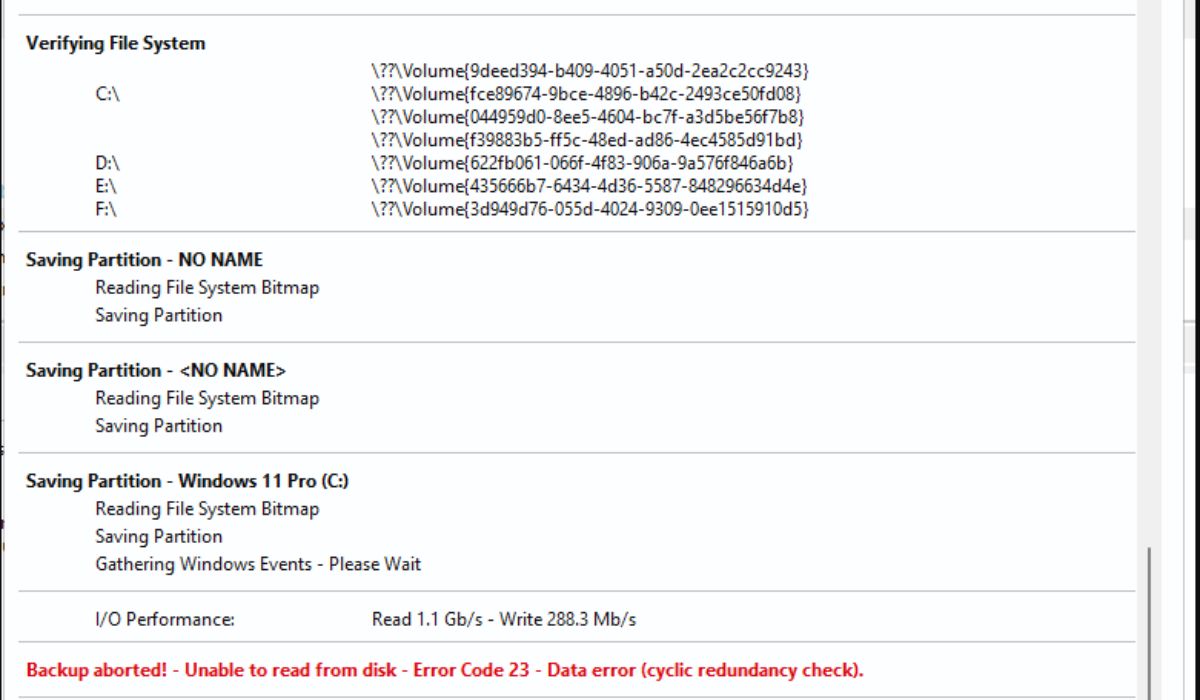
In Macrium Reflect, a CRC failure often appears as Error Code 23, which signals a read error during the imaging process.
How Macrium Reflect Detects CRC Errors
Macrium Reflect is disk imaging software. During a backup, it reads sectors from your hard drive or SSD and creates a backup image file.
If Macrium attempts to read a sector that contains corrupted data or physical damage, the CRC check fails. At that point, the program reports an error and may stop the backup.
Macrium does not create the corruption. It simply detects it while reading disk data. If a sector cannot be read properly, the CRC system flags it.
Common Causes of CRC Errors in Macrium Reflect
CRC errors typically result from storage-related problems rather than specific folders.
The most common causes include:
- Bad sectors on a mechanical hard drive
- SSD degradation or wear
- Corrupted NTFS file system structures
- Loose or damaged SATA cable
- Failing external hard drive
- Sudden power interruption during write operations
You can often confirm hardware health by checking the drive’s SMART status.
Can a Corrupted Recycle Bin Trigger a CRC Error?
The Recycle Bin in Windows is not a separate system component. It is a hidden folder called $Recycle.Bin stored on each NTFS volume.
If the Recycle Bin folder itself becomes logically corrupted, this is usually a file system issue. Logical corruption alone does not automatically cause a CRC error unless the disk sectors storing that folder are damaged.
Here is the difference:
- Logical corruption = file structure problem
- Physical sector damage = hardware-level read failure
CRC errors are commonly linked to physical sector problems. If the disk area containing the $Recycle.Bin folder has bad sectors, Macrium may fail when reading that part of the disk. In that case, the Recycle Bin is not the root cause. The underlying disk damage is.
So while a corrupted Recycle Bin can exist, it rarely causes CRC errors by itself. The error usually points to deeper disk integrity issues.
How to Fix Macrium Reflect CRC Error
If you suspect disk corruption, follow these steps carefully.
1. Run CHKDSK
Open Command Prompt as Administrator and run:
chkdsk C: /f /r
Replace C: with the affected drive letter. The CHKDSK utility scans for file system errors and bad sectors.
2. Check SMART Status
Use a disk monitoring tool to review SMART health data. If the drive reports failing status, consider replacing it.
3. Reset the Recycle Bin
If you believe the Recycle Bin folder is corrupted, you can reset it by deleting the $Recycle.Bin folder from the drive using elevated permissions. Windows will recreate it automatically after restart.
4. Test the Drive on Another System
If using an external hard drive, test it with another cable or computer. Connection issues can cause read errors.
5. Replace the Drive if Necessary
Repeated CRC errors often indicate hardware failure. Back up important data immediately if errors continue.
When It Is Likely a Hardware Problem
CRC errors that appear repeatedly in the same disk region usually point to physical damage. Warning signs include:
- Slow read speed
- Clicking sounds from HDD
- Multiple read failures
- Backup stopping at the same percentage
If these symptoms appear, do not rely on the drive for long-term storage.
Final Conclusion
A corrupted Recycle Bin alone does not typically cause a Macrium Reflect cyclic redundancy check error. CRC errors are usually linked to bad sectors, NTFS file system damage, or hardware failure.
If you encounter Error Code 23 in Macrium Reflect, start by checking disk health with CHKDSK and SMART diagnostics. The issue is more likely related to storage integrity than to the Recycle Bin folder itself.
If you are seeing a specific CRC error message, share the exact code and drive type. That helps narrow down the root cause.